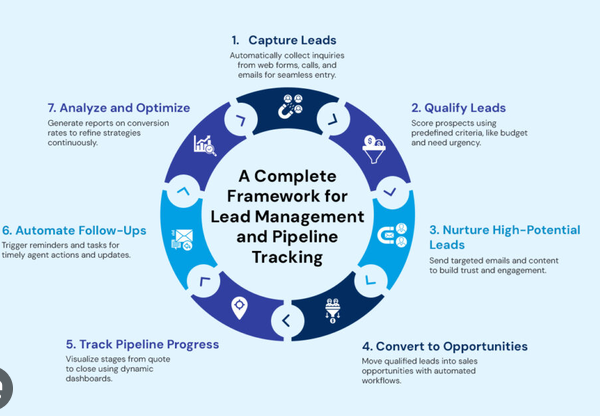
Choosing the right insurance CRM software is an important decision for any insurance agency that wants to improve customer relationships, manage leads efficiently, increase policy sales, and deliver better customer service. As the insurance industry becomes more competitive, agencies need reliable tools to organize client information, track sales opportunities, manage policy renewals, and communicate with customers effectively.
Insurance Customer Relationship Management (CRM) software helps agencies centralize customer information and automate many routine activities. Instead of relying on spreadsheets, paper documents, emails, and separate applications, insurance professionals can use a single platform to manage their daily operations.
However, not every CRM solution is suitable for every agency. Some platforms are designed specifically for insurance brokers and independent agents, while others focus on general sales and customer relationship management. The best choice depends on your agency’s size, insurance products, workflow, budget, technology requirements, and long-term goals.
This guide explains how to choose the right insurance CRM software, which features to evaluate, what mistakes to avoid, and how to ensure that your investment delivers lasting value.
What Is Insurance CRM Software?
Insurance CRM software is a digital platform designed to help insurance agencies manage customer relationships throughout the insurance lifecycle. It organizes information about prospects, existing policyholders, sales activities, communication history, and follow-up tasks.
Depending on the platform, insurance CRM software may also include policy management, renewal reminders, lead distribution, sales automation, reporting, and integrations with insurance agency management systems.
For example, when a potential customer requests an insurance quote, the CRM can record the lead’s contact information, assign it to an agent, schedule a follow-up, and track the opportunity until the customer purchases a policy.
After the policy is sold, the agency can continue using the CRM to manage communications, identify cross-selling opportunities, and remind the agent when the policy approaches its renewal date.
Insurance CRM software is particularly useful for life insurance agencies, health insurance brokers, auto insurance agencies, property insurance providers, commercial insurance brokers, and independent insurance agents.
1. Identify Your Agency’s Business Requirements
Before comparing software providers, determine what your agency actually needs. Purchasing a CRM without understanding your requirements can lead to unnecessary expenses and poor adoption.
Start by examining your current processes and identifying the areas that require improvement.
Evaluate Your Current Challenges
Consider the problems your agency faces every day. For example:
- Leads are lost because agents forget to follow up.
- Customer information is scattered across multiple spreadsheets.
- Policy renewal dates are difficult to track.
- Agents spend too much time entering data manually.
- Managers cannot easily measure sales performance.
- Customer communication is inconsistent.
- Reporting takes several hours each week.
Write down the most important challenges and rank them according to their business impact. This list will help you determine which CRM features are essential and which are optional.
Define Your Business Goals
Your goals should be specific and measurable. You might want to increase lead conversion rates, reduce missed renewals, shorten response times, or improve customer retention.
For example, an agency may aim to reduce missed follow-ups by 50% within six months of implementing a CRM. Another agency may want to reduce the time employees spend preparing weekly sales reports.
Clear objectives make it easier to compare platforms and evaluate the results after implementation.
2. Choose Between Insurance-Specific and General CRM Software
One of the first decisions is whether to purchase a CRM designed specifically for insurance businesses or a general-purpose CRM that can be customized for insurance workflows.
Both options can be useful, but they serve different needs.
Insurance-Specific CRM Software
Insurance-specific CRM platforms are developed with insurance sales processes and customer relationships in mind. Depending on the product, they may offer insurance-oriented fields, renewal workflows, policyholder records, commission tracking, quote follow-ups, and integrations with industry systems.
These features can reduce the amount of customization required before the software becomes useful.
An insurance-focused CRM may be particularly suitable for agencies that handle many policies, manage recurring renewals, or operate across several insurance product lines.
General CRM Software
General CRM platforms are designed for businesses across different industries. They often provide contact management, sales pipelines, automation, email integration, dashboards, and customizable workflows.
Their flexibility can be useful for agencies with unique sales processes or businesses that want to connect insurance sales with broader marketing and customer service activities.
However, a general CRM may require additional configuration or third-party integrations to support insurance-specific tasks.
Which Option Is Better?
| Requirement | Insurance-Specific CRM | General CRM |
|---|---|---|
| Insurance workflows | Often available by default | May require customization |
| Policyholder management | May include specialized fields | Depends on configuration |
| Lead tracking | Usually supported | Usually supported |
| Renewal automation | May be built in | May require custom workflows |
| Customization | Varies by platform | Often highly flexible |
| Industry integrations | May include insurance-focused options | Depends on available integrations |
| Initial setup | Potentially faster for insurance tasks | May require additional configuration |
The best option is the one that fits your workflow without creating unnecessary complexity. Do not assume that a specialized CRM is automatically better; evaluate the actual features included in each product.
3. Evaluate Lead Management Capabilities
Lead management is one of the most important functions of insurance CRM software because agencies need a reliable process for converting inquiries into paying customers.
Without an organized system, potential clients may wait too long for a response or never receive a follow-up.
Lead Capture
Look for software that can collect leads from multiple sources, including website forms, email inquiries, telephone calls, online advertising, referral programs, and social media campaigns.
Automatic lead capture reduces manual data entry and helps ensure that new inquiries enter the sales pipeline quickly.
Lead Assignment
The CRM should allow managers to assign leads to agents according to location, insurance product, workload, specialization, or other business rules.
For example, a commercial insurance inquiry could automatically go to an agent who specializes in business coverage.
Lead Scoring and Prioritization
Some CRM platforms provide lead scoring tools that help agents prioritize promising prospects. These systems may use information such as customer interest, previous interactions, quote requests, and engagement activity.
Lead scoring can help teams focus their attention on opportunities that are more likely to progress, although scores should be reviewed regularly to ensure that they reflect real customer behavior.
Follow-Up Reminders
Choose a platform that supports reminders, scheduled tasks, and automated follow-up sequences.
An agent should be able to see which prospects require a phone call, which customers are waiting for a quote, and which opportunities have remained inactive for too long.
Effective lead management improves accountability and reduces the risk of losing business because of missed communication.
4. Check Policy and Customer Information Management
Insurance agencies handle detailed information about customers, policies, coverage requirements, claims inquiries, and renewal dates. A suitable CRM should make this information easy to access and update.
Centralized Customer Profiles
Each customer record should provide a clear view of important information, including:
- Contact details and communication preferences.
- Insurance products and policy references.
- Previous interactions and follow-up history.
- Quotes and sales opportunities.
- Renewal dates and upcoming tasks.
- Relevant documents and service notes.
The exact information stored will depend on the agency’s services and applicable privacy requirements.
Centralized records allow agents to understand a customer’s history before making a call or responding to an inquiry.
Policy Tracking
If your agency needs policy-related functionality, confirm that the CRM can record policy types, effective dates, expiration dates, premium information, and relevant status updates.
Some CRMs provide comprehensive policy workflows, while others simply store policy-related information in customer records.
It is important to distinguish between CRM functionality and a full insurance agency management system. A CRM may support customer relationships without providing complete policy administration, accounting, claims processing, or carrier connectivity.
Document Management
Insurance businesses often handle applications, quotations, policy documents, consent forms, and other records.
Look for secure document storage, permission controls, version history, and convenient retrieval. The system should also support your agency’s document retention and access policies.
5. Look for Automated Policy Renewal Management
Policy renewals are a major opportunity for maintaining customer relationships and generating recurring business. However, missed renewal dates can result in lost customers and unnecessary administrative work.
A good insurance CRM should help your team identify upcoming renewals and follow a consistent communication process.
Automated Renewal Reminders
The system should allow agents to set reminders based on policy expiration dates. For example, an agency may choose to contact customers 60 days, 30 days, and 7 days before a policy expires, depending on the product and its renewal process.
These schedules should be configurable rather than fixed for every insurance product.
Renewal Pipelines
A renewal pipeline can show which customers have been contacted, which require updated quotations, which are reviewing their options, and which have completed the renewal process.
Managers can use this information to identify delays and distribute work more effectively.
Customer Retention Opportunities
Renewal workflows can also help agents identify customers who may need updated coverage or have questions about changing circumstances.
The purpose is not simply to send automatic messages. It is to give customers timely, relevant assistance that encourages them to continue working with the agency.
6. Assess Sales Automation and Workflow Tools
Insurance agents often perform repetitive tasks throughout the day. Automation can reduce administrative work and give employees more time to focus on customer needs.
Automated Task Creation
The CRM should create tasks automatically when important events occur.
For example, when an agent sends a quotation, the system could schedule a follow-up task for three business days later. When a new lead is assigned, it could create an initial contact task.
Workflow Automation
More advanced platforms allow agencies to create workflows based on specific conditions.
A workflow might begin when a lead submits an online form. The system could record the inquiry, assign an agent, send an acknowledgment, and schedule a follow-up.
Agencies should have the ability to review and modify workflows so automated actions remain appropriate for their customers and business processes.
Email and Communication Automation
Email templates, appointment reminders, and approved communication sequences can improve consistency.
However, automated communications should comply with applicable marketing, privacy, consent, and insurance regulations. Customers should not receive irrelevant or excessive messages simply because the CRM supports automation.
7. Review Integration Options
Insurance agencies often use several software applications simultaneously. A CRM that cannot communicate with these systems may create additional work instead of reducing it.
Before selecting a platform, identify the applications your team already uses.
Insurance Agency Management Systems
If your agency already uses an agency management system, determine whether the CRM can integrate with it. This may help synchronize customer records, policy information, and other relevant data.
Do not assume that integration is available simply because both systems are designed for insurance businesses.
Email and Calendar Applications
Integration with email and calendar tools can help agents manage appointments, record conversations, and schedule follow-ups.
Check whether the integration supports your preferred email provider and whether communication history can be associated with the correct customer record.
Website and Lead Generation Tools
If your website generates insurance inquiries, consider a CRM that can capture form submissions automatically.
Marketing platforms and advertising tools may also connect to the CRM, helping your team understand where leads originate and which campaigns generate valuable prospects.
Accounting and Quotation Systems
Some agencies may benefit from connections with accounting applications, payment platforms, quotation tools, and electronic signature services.
Prioritize integrations that eliminate repeated data entry or improve the accuracy of important records.
Ask vendors whether each integration is native, provided by a third party, or dependent on a custom API connection. Also ask whether additional subscription or implementation fees apply.
8. Examine Reporting and Analytics Features
Reporting tools help insurance agencies understand sales performance, customer behavior, renewal outcomes, and operational efficiency.
A CRM should provide clear reports that support practical business decisions rather than overwhelming managers with unnecessary data.
Sales Performance Reports
Look for reports covering leads received, quotations issued, opportunities won or lost, conversion rates, and sales activity by agent.
These reports help managers identify successful practices and determine where additional training may be necessary.
Customer Retention Reports
Retention reporting can show how many customers renew their policies, how many leave, and which customer groups require additional attention.
If the CRM does not include dedicated retention reports, check whether you can create them using custom fields or connected reporting tools.
Marketing Performance
Where reliable tracking is available, the system should help compare lead sources and marketing campaigns.
For example, an agency may want to know whether website inquiries, referrals, or paid advertisements produce the highest proportion of qualified prospects.
Custom Dashboards
Custom dashboards allow different users to see relevant information. Agents may need personal task lists and sales pipelines, while managers may need team performance, upcoming renewals, and workload reports.
Before purchasing, test whether reports can be exported and whether the data can be filtered by product, agent, date range, or location.
9. Prioritize Data Security and Regulatory Compliance
Insurance agencies may process sensitive personal, financial, and insurance-related information. Protecting these records is essential for maintaining customer trust and meeting applicable legal obligations.
Security should be evaluated before a purchase, not after the system has been implemented.
Access Controls
The CRM should allow administrators to assign permissions according to employees’ responsibilities.
For example, an agent may need access to their assigned customers, while a manager may need access to team records. Administrative privileges should be limited to authorized personnel.
Data Encryption
Ask whether the provider encrypts data during transmission and while stored. You should also understand how the provider protects backups and handles security incidents.
Encryption is an important safeguard, but it should form part of a broader security program.
Multi-Factor Authentication
Multi-factor authentication adds another layer of protection by requiring an additional verification method when users sign in.
This is particularly valuable for systems that contain sensitive customer records.
Backup and Recovery
Find out how frequently data is backed up, how long backups are retained, and how quickly the provider can restore service following an incident.
Ask whether your agency can export its information if it decides to move to another platform.
Compliance Requirements
Requirements vary by country, insurance product, and the type of information being processed. Depending on the agency’s operations, relevant obligations may include privacy legislation, insurance regulations, marketing consent rules, and contractual requirements imposed by carriers or business partners.
Review the vendor’s security documentation, data processing terms, retention policies, and incident response procedures. If your agency serves customers across multiple jurisdictions, obtain appropriate professional advice about its compliance obligations.
10. Compare Pricing and Total Cost of Ownership
Price is an important factor, but the cheapest CRM is not always the most affordable option over time.
Some vendors advertise a low monthly subscription while charging separately for essential features, integrations, implementation, or support.
Subscription Pricing
CRM vendors may charge per user, per month, or according to a package that includes a certain number of users and features.
Calculate the expected cost based on the number of agents, managers, and administrative employees who will need access.
Also check whether the subscription includes the automation, reporting, storage, and integration features your agency requires.
Implementation Costs
Implementation may involve importing customer data, configuring workflows, creating templates, setting permissions, and connecting existing software.
Ask the provider whether these services are included or charged separately.
Training and Support Costs
Employees may need training before they can use the system effectively. Some vendors include training sessions, while others charge additional fees for onboarding or advanced assistance.
Reliable support can be especially important when the CRM is central to daily sales and customer service operations.
Calculate the Long-Term Value
Consider the following simplified example.
Suppose a CRM costs $300 per month and helps an agency save 20 employee hours each month. If the agency values those hours at $20 each, the estimated monthly value of the saved time is $400.
In this example, the estimated value of the saved time exceeds the subscription cost by $100 per month, before considering implementation costs, other benefits, or potential drawbacks.
This is only an illustration. Actual results depend on employee efficiency, adoption, workflow quality, and the software’s capabilities.
Compare the total expected cost with measurable improvements rather than relying on the advertised subscription price alone.
11. Test Ease of Use and User Experience
Even a feature-rich CRM can fail if employees find it difficult to use.
A complicated interface may encourage staff to return to spreadsheets, keep separate notes, or delay updating customer records. These habits reduce the value of centralized information.
Request a Live Demonstration
Ask the vendor to demonstrate everyday tasks using realistic insurance scenarios.
For example, request a demonstration of how an agent captures a lead, records a quotation, schedules a follow-up, updates a customer record, and manages an upcoming renewal.
This approach reveals whether the software supports your actual workflow.
Test the Mobile Experience
Insurance agents may need to access customer information while traveling, attending meetings, or visiting clients.
If mobile access is important, test the mobile application or browser interface. Check whether agents can update records, review tasks, and access permitted documents from their devices.
Consider the Learning Curve
Ask how long typical onboarding takes and what training materials are available.
A system with a simple interface, helpful documentation, and accessible support may achieve higher adoption than a more complicated alternative with a longer list of features.
12. Evaluate Customer Support and Vendor Reliability
Your CRM provider will become an important technology partner. Problems with the system can affect lead management, customer communication, and day-to-day operations.
Before making a decision, assess the quality of the vendor’s support services.
Support Availability
Check the available support channels, such as email, live chat, telephone, or a support ticket system.
If your agency operates outside the vendor’s main time zone, confirm whether support is available during your business hours.
Training Resources
Useful training resources may include video tutorials, user guides, webinars, knowledge bases, and onboarding sessions.
These materials help new employees learn the platform without relying entirely on managers or technical staff.
Product Updates
Ask how often the vendor releases updates and how it communicates changes.
A reliable provider should explain important changes, maintain documentation, and provide a clear process for reporting bugs or requesting assistance.
Business Continuity
Consider the vendor’s operating history, service reliability, backup practices, and approach to data portability.
Review the contract carefully, particularly the provisions covering service interruptions, cancellation, data export, and account termination.
13. Check Scalability and Customization
Your agency’s needs may change as it hires more employees, adds insurance products, or expands into new markets.
Choosing a platform that cannot accommodate future growth may require an expensive migration later.
Support for More Users
Determine whether adding new agents requires a different subscription package or substantial additional costs.
Also check whether permissions, reporting, and team management remain practical as the organization grows.
Custom Fields and Workflows
Your agency may need to record specialized information for particular products or customer groups.
A flexible CRM should allow authorized administrators to create relevant fields, customize sales stages, and adjust workflows without requiring extensive technical development.
Multi-Branch Management
If your agency operates across several branches, confirm whether the system supports separate teams, branch-level reporting, shared customer records, and centralized administration.
Data Portability
Before signing a contract, establish how you can export customer information, activity records, documents, and other essential data.
Check the available file formats, export limitations, and any fees associated with leaving the platform.
Scalability includes not only the ability to grow but also the ability to change systems without losing control of your business information.
14. Create a Shortlist and Compare Vendors
After identifying your requirements, select three to five CRM platforms for detailed evaluation.
Comparing too many products at once can make the decision unnecessarily complicated. A focused shortlist allows you to examine important differences more carefully.
Use a consistent evaluation process for every vendor.
Create a Feature Comparison Matrix
The following example can help organize your evaluation.
| Evaluation Criteria | Suggested Weight |
|---|---|
| Lead and sales management | 20% |
| Policy and renewal workflows | 20% |
| Security and access controls | 15% |
| Integrations and automation | 15% |
| Ease of use | 10% |
| Reporting and analytics | 10% |
| Pricing and total cost | 5% |
| Support and scalability | 5% |
| Total | 100% |
Assign each vendor a score from 1 to 5 for every category. Multiply each score by its assigned weight, using a consistent scoring method, to calculate an overall weighted result.
The weights are illustrative and should be adjusted to reflect your agency’s priorities. For example, a small agency focused on customer retention may give renewal management a higher weight, while a growing brokerage may prioritize integrations and scalability.
A scoring matrix supports a more objective decision, but it should not replace security reviews, reference checks, or hands-on testing.
15. Use a Free Trial or Pilot Program
A product demonstration shows what the software can do, but a trial helps establish whether it works for your employees.
Whenever possible, test the leading CRM with a small group before purchasing it for the entire agency.
Choose Realistic Test Scenarios
Your pilot program should cover common tasks such as:
- Adding a new prospect.
- Assigning a lead to an agent.
- Recording customer communication.
- Preparing and tracking a quotation.
- Scheduling a renewal reminder.
- Generating a sales report.
- Finding a customer record quickly.
- Exporting data for reporting or backup purposes.
Use test records or appropriately authorized data, and avoid exposing sensitive customer information during an unsecured trial.
Collect Employee Feedback
Ask participating employees whether the software saves time, simplifies their tasks, and makes customer information easier to access.
Record technical issues, missing features, confusing screens, and integration problems.
Measure Results
Compare performance before and after the pilot using metrics such as response time, lead follow-up completion, time spent on administrative tasks, and renewal processing efficiency.
The trial should answer a practical question: does the CRM improve the way your agency works enough to justify its cost?
16. Plan the Implementation Process
Selecting the right software is only part of the process. A successful implementation also requires planning, clean data, employee training, and clear responsibilities.
Clean Existing Data
Before migrating information, remove duplicate records, correct inaccurate contact details, and standardize important fields.
Poor-quality data can undermine the benefits of even the best CRM.
Assign an Implementation Owner
Choose an employee or manager who will coordinate the project, communicate with the vendor, track progress, and resolve implementation issues.
The person should understand the agency’s workflow and have enough authority to coordinate decisions across the team.
Migrate Data Carefully
Determine which records need to be transferred, how documents will be handled, and how data accuracy will be verified.
Test the migration with a small sample before importing all records. Keep an appropriate backup of the original information until the new system has been validated.
Train Employees
Provide practical training based on employees’ daily responsibilities. Agents may need help with lead management and follow-ups, while managers may require training on reports, permissions, and team performance.
Review the Results
After implementation, monitor adoption and compare the system’s performance with the goals established at the beginning of the project.
Make adjustments when employees struggle with workflows or when reports reveal avoidable delays.
17. Common Mistakes to Avoid When Choosing Insurance CRM Software
Several mistakes can lead agencies to purchase unsuitable software.
Choosing Based on Price Alone
A low subscription price may hide limitations in automation, reporting, storage, or integration. Compare the full cost and expected value rather than selecting the cheapest option automatically.
Purchasing Too Many Features
Advanced analytics, extensive customization, and complex automation may sound attractive, but they can increase costs and make the system harder to use.
Start with the capabilities your agency needs today while allowing room for future growth.
Ignoring Employee Feedback
Employees use the CRM every day. Failing to involve them in the selection process may result in poor adoption and resistance to change.
Include representatives from sales, customer service, and administration when evaluating platforms.
Overlooking Integration Requirements
A CRM that cannot connect with essential existing systems may create duplicate work and inconsistent records.
Confirm important integrations before signing the contract.
Failing to Check Security
Do not assume that every cloud-based CRM automatically meets your agency’s security requirements.
Review authentication, permissions, encryption, backup policies, data handling, and vendor responsibilities.
Skipping the Trial
Buying a system based only on marketing claims can lead to disappointing results.
Test real workflows and involve the people who will use the platform.
Conclusion
Choosing the right insurance CRM software requires a clear understanding of your agency’s goals, operational challenges, customer needs, and technology requirements. The best platform should simplify lead management, centralize customer information, support renewal workflows, automate repetitive tasks, and provide useful reporting.
Start by identifying your most important problems, then compare insurance-specific and general CRM solutions according to their practical capabilities. Evaluate integrations, security, pricing, ease of use, scalability, and vendor support before making a final decision.
A structured shortlist, weighted comparison matrix, and hands-on trial can help you avoid costly mistakes. After selecting a platform, invest in data preparation, employee training, and ongoing performance measurement.
Ultimately, the right insurance CRM is not necessarily the platform with the most features. It is the one that fits your agency’s workflow, helps your employees serve customers more effectively, and supports sustainable business growth over time.